SSH Authentication with FIDO2
Compatible Nitrokeys |
|||||||
|---|---|---|---|---|---|---|---|
✓ active |
✓ active |
⨯ inactive |
⨯ inactive |
✓ active |
⨯ inactive |
⨯ inactive |
⨯ inactive |
SSH (Secure Shell) is a network protocol used to securely access and manage remote systems such as servers or code repositories. It uses cryptographic key pairs for authentication, allowing passwordless logins with strong security.
With a Nitrokey, the private SSH key is generated and stored directly on the device, so it never leaves the hardware. Each login requires you to touch the Nitrokey, adding a simple physical confirmation that protects against unauthorized access. For example, when connecting to a server, GitLab, or GitHub.
Non-Discoverable Credentials
当用户向支持 FIDO2/WebAuthn 的身份验证系统注册 Nitrokey 时,创建的默认身份验证类型是不可发现证书。身份验证系统会存储密钥句柄,而私钥则安全地保存在硝基钥匙中。这种配置不占用 Nitrokey 上的存储空间,登录时依赖认证系统提供密钥句柄。FIDO2 PIN 控制对硝基的访问,并授权所有涉及私钥的操作。
Discoverable Credentials
可发现凭证直接存储在硝基上,包括认证所需的所有凭证信息和元数据。这样,认证系统就能自动找到凭证,而无需提供外部密钥句柄,并实现无用户名认证。可发现凭据受 FIDO2 PIN 的保护,FIDO2 PIN 可授权使用凭据,确保只有授权用户才能访问凭据。每个凭证通常占用几百个字节的安全存储空间。凭证总数取决于硝基型号和固件版本,一般在 25 到 100 条之间。
Generating SSH Key
Insert the Nitrokey into your computer.
Open a terminal and create your SSH key. Replace
"your_comment"with a label to identify it (e.g., "Nitrokey GitLab"). By default, the key is created as a non-discoverable credential. In this case, a local key handle is stored in ~/.ssh/ while the private key remains on the Nitrokey. This means the key is tied to the system where it was generated, since the local key handle file is required for authentication. Use the -O resident option to create a discoverable credential. In this case, the credential is stored on the Nitrokey, making it portable and usable across different systems without copying any local files.Non-discoverable credential:
ssh-keygen -t ed25519-sk -C "your_comment"Discoverable credential:
ssh-keygen -t ed25519-sk -O resident -C "your_comment"备注
Discoverable credentials can later be listed and imported on another system with:
ssh-keygen -KDuring key generation, you may also be asked to set a passphrase. This passphrase encrypts the local key handle stored in
~/.ssh/(not the private key on the Nitrokey, which always stays securely inside the device). The passphrase is different from the FIDO2 device PIN. The PIN protects the physical key itself, while the passphrase protects your local SSH public key file. We recommend to use a passphrase to protect non-discoverable keys only.当要求输入文件路径时,请接受默认选项(
~/.ssh/id_ed25519_sk)或选择自定义名称,如``id_ed25519_sk_gitlab``。如果硝基键闪烁,请轻触确认操作。
最终将创建以下文件。如果您在生成密钥时指定了自定义名称,文件名可能会有所不同。
~/.ssh/id_ed25519_sk→ 私钥句柄(安全地存储在硝基上)~/.ssh/id_ed25519_sk.pub→ 公钥文件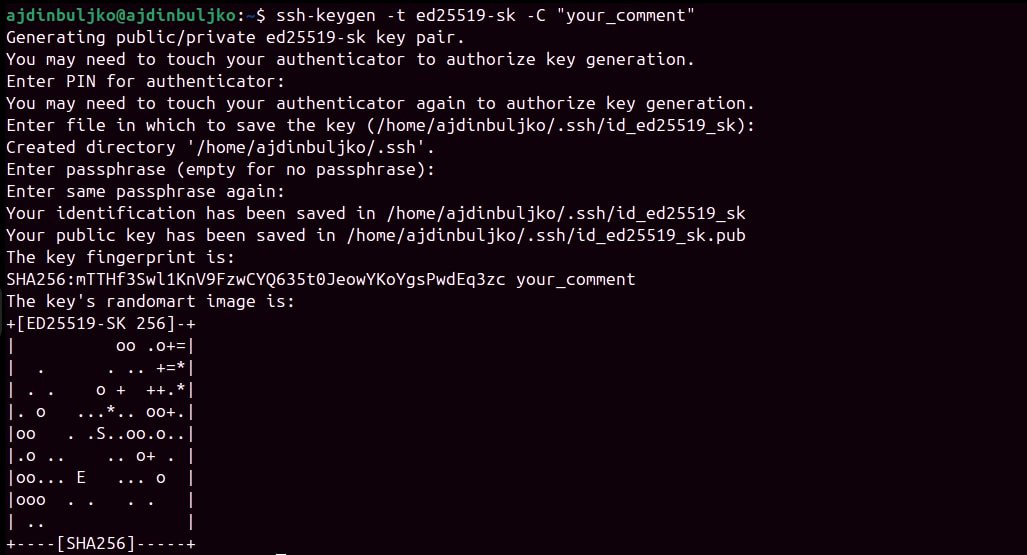
Adding Your Public Key
生成 SSH 密钥对后,必须将公钥添加到要访问的服务或服务器中。
Display your public key:
cat ~/.ssh/id_ed25519_sk.pub输出示例(请勿使用此键)::
sk-ssh-ed25519@openssh.com AAAAGnNrLXNzaC1lZDI1NTE5QG7wZW4zc2guY29tAAAAILeZl6r07HV4i1rK07OfLqD3J4IzX2q0lB6Ok0pdxoG5AAAABHNzaDo= your_comment
Copy the output and add it to your account's SSH key settings.
See GitLab or GitHub for detailed steps.
要启用 SSH 远程服务器访问,请将公钥添加到 SSH 服务器上用户账户的``~/.ssh/authorized_keys`` 文件中。