OpenVPNによるViscosityクライアントの設定
Compatible Nitrokeys |
|||||||
|---|---|---|---|---|---|---|---|
✓ active |
⨯ inactive |
⨯ inactive |
✓ active |
⨯ inactive |
✓ active |
✓ active |
⨯ inactive |
This guide will show to configure Viscosity client to connect to an OpenVPN instance, using a Nitrokey Pro 2 (or Nitrokey Storage 2), and PKCS#11 authentication.
前提条件
このガイドでは、クライアント用にインストール・設定されたOpenVPNリモートサーバーが必要です。このドキュメントでは、Debian 10サーバにインストールされたOpenVPN 2.49を使用しています。
To read about how to configure OpenVPN to authenticate with Nitrokey Pro, you might consult the following documentation, as we will just cover the way to configure the Viscosity client in this guide.
また、以下のものも必要となります。
Nitrokey Pro 2またはNitrokey Storage 2
Client's private key
client.keyloaded on the NitrokeyClient's certificate
client.crtloaded on the NitrokeyThe Certificate Authority file, i.e.
CA.crtfile used for your OpenVPN setupOptional: The shared secret key file, i.e.
ta.key
For more information on PKCS#11 key management with OpenVPN, please consult OpenVPN's documentation.
使用方法
Start Viscosity and create a new connection “OpenVPN” (you can name it as you wish)
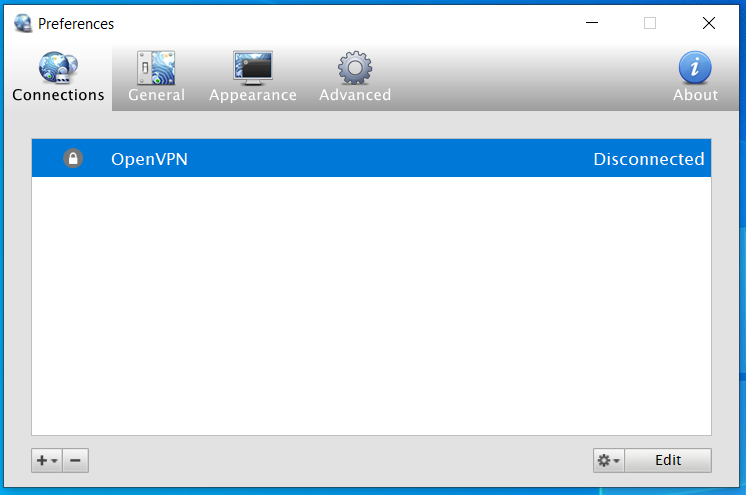
接続部分を右クリックし、「編集」をクリックします。
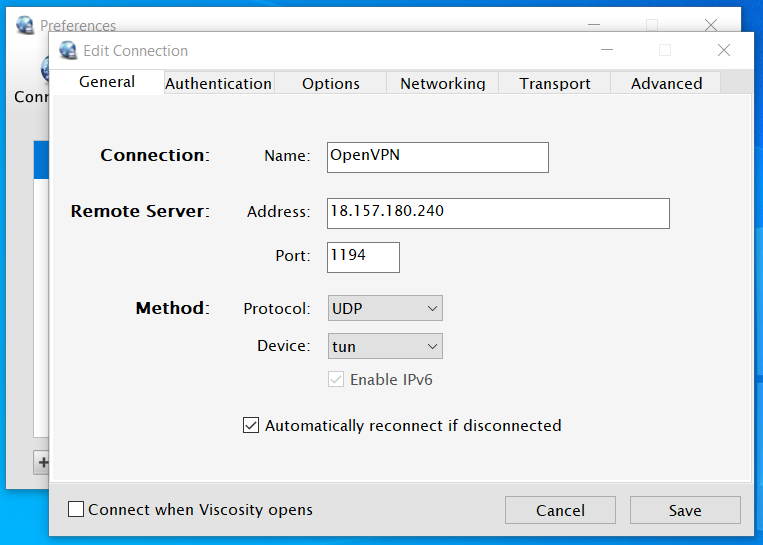
Add your server's IP address and configure the port according to your configuration.
接続先のCAファイルを選択する
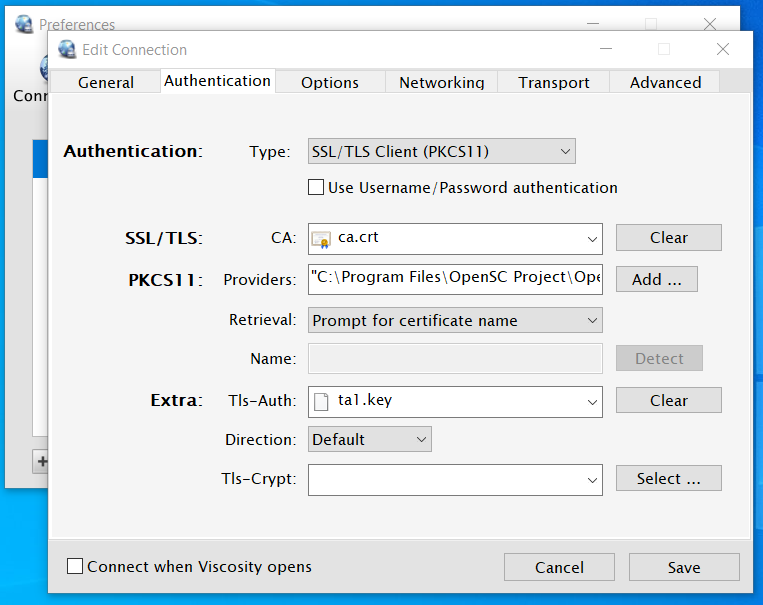
Providersフィールドの横にあるAddボタンをクリックして、Nitrokeyの``PKCS#11``モジュールを選択します。複数のプロバイダーを指定することができますが、ここでは``OpenSC``を使用します。
On macOS, the most common location for modules to be found is in the
/usr/libdirectory. Please refer to the documentation included with your driver software for the location to use. OpenSC's module can be found at/Library/OpenSC/lib/opensc-pkcs11.so.On Windows, the most common location for libraries is either in
C:\Program FilesorC:\Windows\System32. OpenSC libraries are generally located atC:\Program Files\OpenSC Project\OpenSC\pkcs11. There may be more than one library available here, you can try each one or simply add both.検索方法」ドロップダウンメニューから検索方法を選ぶ
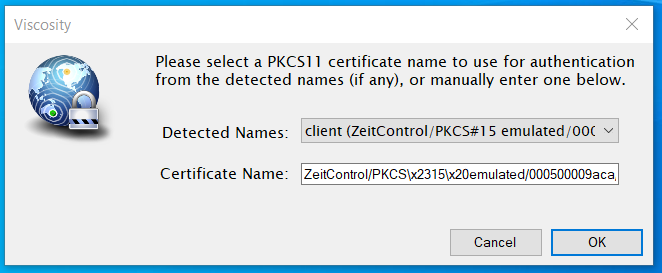
このコンピュータでNitrokeyを1台しか使用しない場合は、``Use certificate name below``を選択します。Nitrokeyが現在コンピュータに接続されている場合は、``Detect``ボタンをクリックすると、ViscosityのNameフィールドが自動的に入力されます。それ以外の場合は、このフィールドは手動で記入できます。
If in doubt, or if more than one Nitrokey may be used (i.e. multiple users), then select
Prompt for certificate name.
``Prompt for certificate name``が選択された場合、Viscosityは指定されたPKCS#11モジュール/sを使用して、Nitrokeyで必要なキーを自動的に検出します。検出されたデバイスの中から選択するか、手動で使用する``serialized id``の名前を入力します。また、必要に応じてパスワード/PINの入力を求められます。
保存ボタンをクリックして、メインインターフェースから接続する
リファレンス
` トークン/スマートカードの使用(PKCS#11) <https://www.sparklabs.com/support/kb/article/using-tokens-smartcards-pkcs-11/>`_。
`OpenVPN HOWTO <https://openvpn.net/community-resources/how-to/>`_となります。
備考
Viscosityは無料ではありませんので、無料版の使用には問題があるかもしれません。
フリーでオープンな代替手段として、`Pritunl <https://client.pritunl.com/>`_の使用を検討しています。