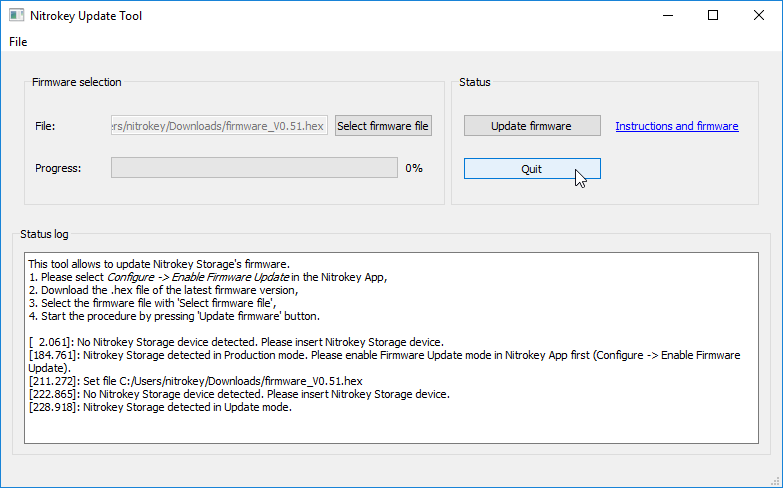
Download the Nitrokey App and the program “dfu-programmer” which should be available through your package-manager, e.g. apt-getupdate&&apt-getinstalldfu-programmer on Debian-based systems.
here から最新のファームウェア ".hex" をダウンロードし、ホーム フォルダに "firmware.hex" として保存してください。古いリリースは、here です。
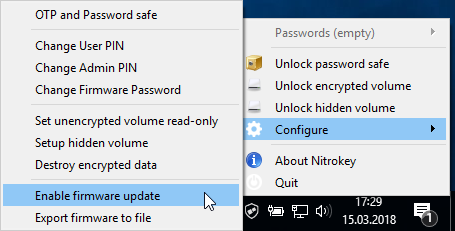
Right click on the icon of the Nitrokey App and go to “Configure” -> “Enable Firmware Update”. The default firmware password is 12345678.
sudodfu-programmerat32uc3a3256serase
sudodfu-programmerat32uc3a3256sflash--suppress-bootloader-memfirmware.hex
sudodfu-programmerat32uc3a3256slaunch
# versions <0.7 of dfu-programmer use "start" instead of "launch"
Microsoft Windows Build 1809およびNitrokey Storage Firmware 0.52以下を使用している場合は、別のシステムを使用するか、それが不可能な場合は`本説明書<firmware-update-manually.html>`_を使用してファームウェアアップデートモードを有効にしてください。
Microsoft Windows Build 1809およびNitrokey Storage Firmware 0.52以下を使用している場合は、別のシステムを使用するか、それが不可能な場合は`本説明書<firmware-update-manually.html>`_を使用してファームウェアアップデートモードを有効にしてください。