A continuación se describe el proceso de actualización del software del sistema NetHSM. Este método de instalación solo debe utilizarse si no está disponible la actualización descrita en Software Update. Siga las instrucciones al pie de la letra para evitar cualquier eliminación accidental de datos. Se recomienda exportar una copia de seguridad desde el NetHSM antes de realizar la actualización.
The system software update can be performed as follows.
Download the installer image ending with installer.img.zip from the provided private download page.
Descomprima la imagen del instalador.
Write the installer image to a USB flash drive.
For this you could use the graphical tool balenaEtcher.
On Linux you could also use the command line tool dd.
Ignore any warning that a partition table is missing.
Conecta la memoria USB a cualquier puerto USB de la parte delantera o a uno de los dos puertos USB 2.0 situados en el centro de la parte trasera del aparato. Los puertos USB 2.0 tienen una pieza negra en el centro del puerto.
Nota
Some USB drives are incompatible with the NetHSM.
This results in the NetHSM not recognizing them as a boot media.
In case the NetHSM does not boot from the connected USB drive, try a different USB drive model.
Apaga el NetHSM y desconéctalo de la corriente.
Connect a monitor and optionally a keyboard to the NetHSM.
Nota
Asegúrate de que solo tengas el teclado y la memoria USB conectados a los puertos USB.
Connect the NetHSM to power and wait for 10 seconds.
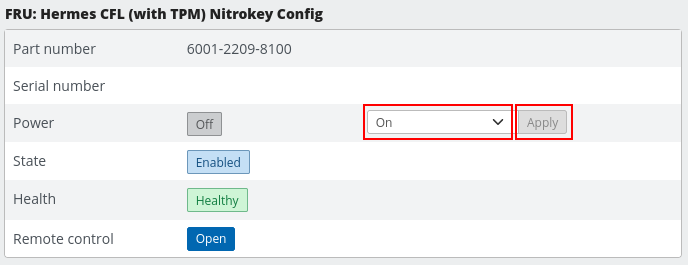
Turn on the NetHSM by pressing the power button on the front.
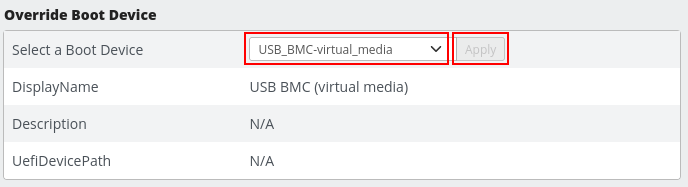
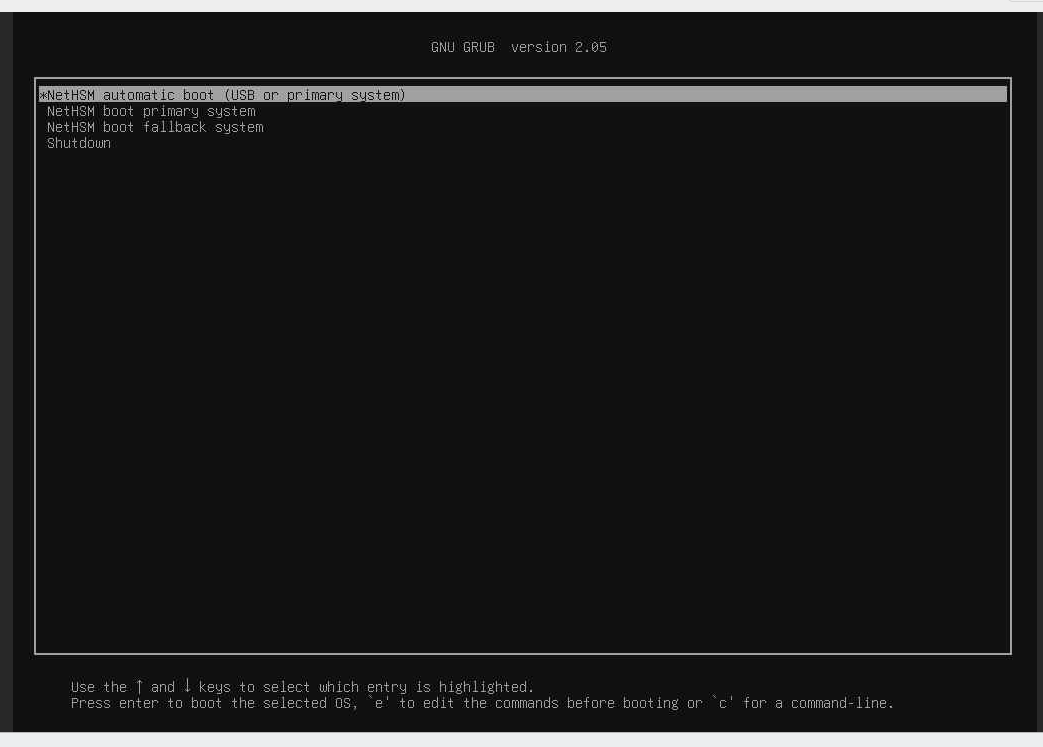
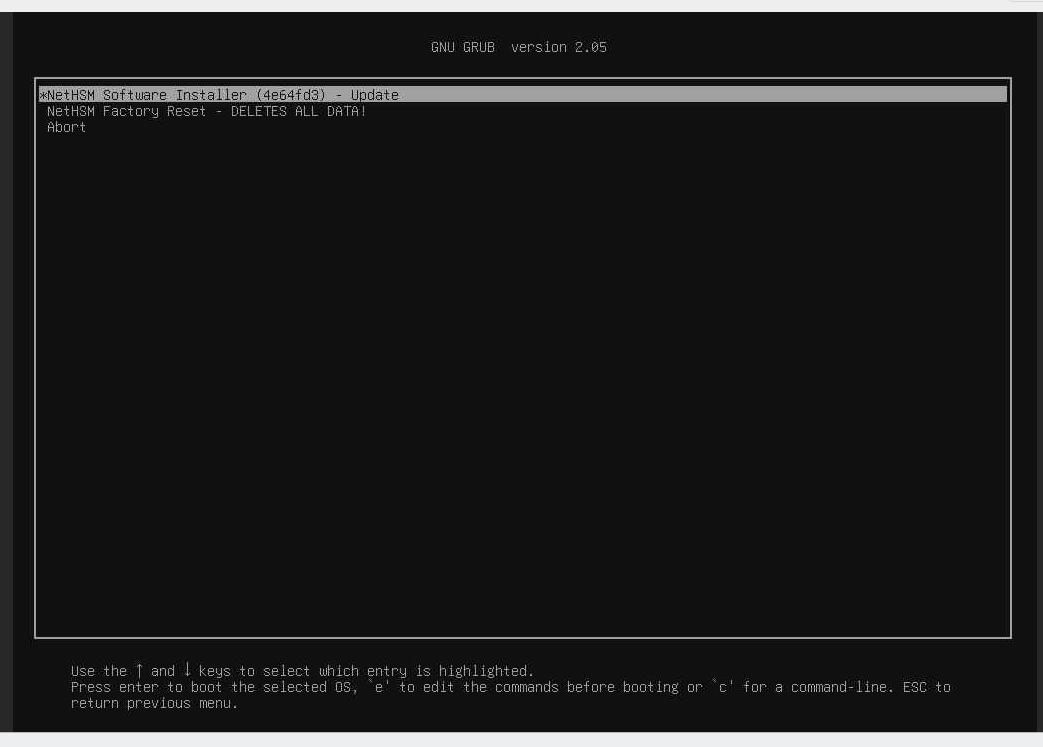
Al cabo de unos 30 segundos, el NetHSM mostrará un menú de arranque en la pantalla. El menú de arranque estará configurado por defecto para realizar la actualización de software. Esto tardará unos 2 minutos. El equipo se apagará automáticamente una vez finalizada la actualización.
Alternatively you can select NetHSM automatic boot (USB or primary system) in the first boot menu and then NetHSM Software Installer in the second boot menu.
Advertencia
Do NOT select NetHSM Factory Reset - DELETES ALL DATA! from the menu.
This will irrecoverably wipe the data on the disk.
Turn on the NetHSM by pressing the power button on the front.
Download the installer image ending with installer.img.zip from the provided private download page.
Descomprima la imagen del instalador.
Asegúrese de que el sistema está apagado, pero conectado a la corriente, y el botón de encendido de la parte posterior encendido.
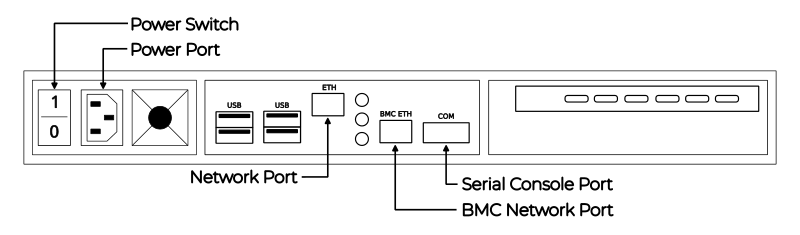
Conecte el puerto de red del BMC con un cable de red.
Consulte la siguiente imagen para identificar el puerto de red BMC.
Por defecto, el BMC espera una asignación de dirección con DHCP. Si DHCP no está disponible, la dirección link-local se puede determinar con Nmap. El comando nmap<network-in-cidr-notation>-p80--open devolverá una lista de hosts con el puerto 80 abierto.
Abra el sitio web de BMC en un navegador web, utilizando la dirección IP determinada en el paso anterior. Para iniciar sesión, las credenciales predeterminadas son nombre de usuario bmc_admin, y contraseña 8mCU$3r0nE.
Importante
In case you encounter an unauthorized login error on the BMC web interface it can be one of the following issues.
Nombre de usuario o contraseña incorrectos.
Durante el restablecimiento de fábrica, el BMC genera un nuevo certificado TLS. Algunos navegadores web fallan con errores de conexión cuando cambia el certificado mientras permanece abierta la misma ventana. Cierre la ventana del navegador web y abra una nueva.
El software BMC a veces muestra el problema de que no acepta una cookie de sesión antigua que todavía está en la caché del navegador web. Borre la caché del navegador web y vuelva a intentarlo.
Mount the downloaded installer image by clicking in the menu on the left on FRU: Hermes CFL (with TPM) Nitrokey Config followed by Virtual media in the submenu.
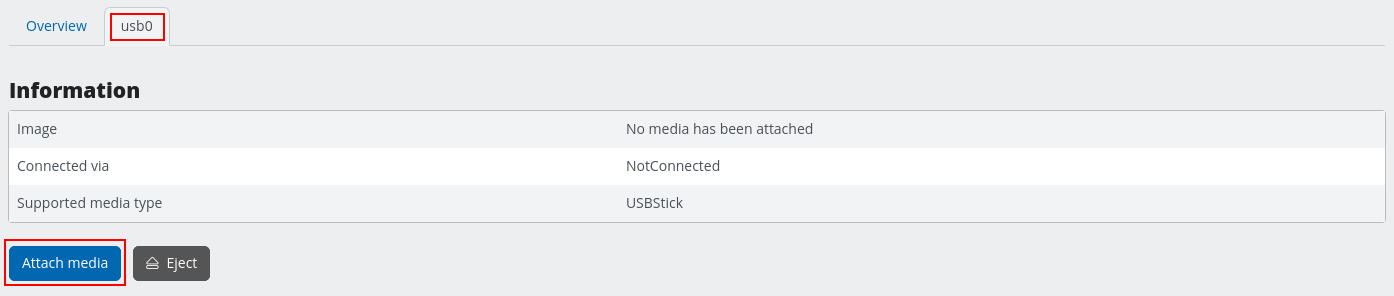
In the middle open the tab usb0, and click the button Attach media.
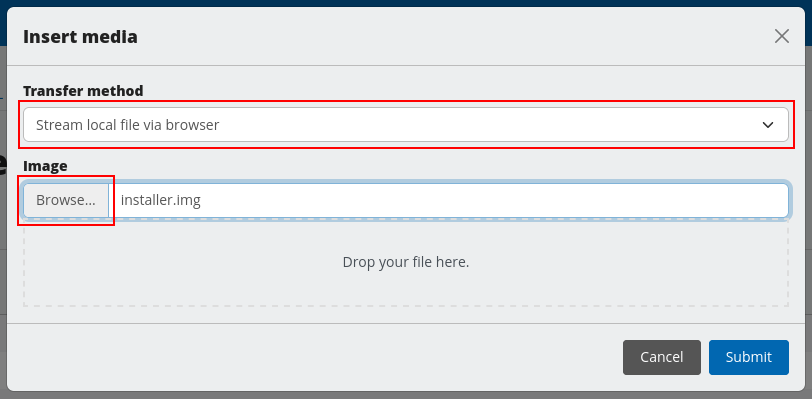
In the opening dialog choose Stream local file via browser as the Transfer method.
Click the button Browse… and choose the downloaded installer image.
Confirm the operation with the Submit button.