SSH Authentication with FIDO2
Compatible Nitrokeys |
|||||||
|---|---|---|---|---|---|---|---|
✓ active |
✓ active |
⨯ inactive |
⨯ inactive |
✓ active |
⨯ inactive |
⨯ inactive |
⨯ inactive |
SSH (Secure Shell) is a network protocol used to securely access and manage remote systems such as servers or code repositories. It uses cryptographic key pairs for authentication, allowing passwordless logins with strong security.
With a Nitrokey, the private SSH key is generated and stored directly on the device, so it never leaves the hardware. Each login requires you to touch the Nitrokey, adding a simple physical confirmation that protects against unauthorized access. For example, when connecting to a server, GitLab, or GitHub.
Non-Discoverable Credentials
Pooblastilo, ki ga ni mogoče odkriti, je privzeta vrsta pooblastila, ki se ustvari, ko uporabnik registrira svoj Nitrokey v sistemu preverjanja pristnosti, ki podpira FIDO2/WebAuthn. Sistem za preverjanje pristnosti shrani ključno ročico, zasebni ključ pa ostane varno shranjen v Nitrokey. Ta konfiguracija ne uporablja prostora za shranjevanje v ključu Nitrokey in je odvisna od sistema za preverjanje pristnosti, ki med prijavo zagotovi ključno ročico. PIN FIDO2 nadzira dostop do ključa Nitrokey in avtorizira vse operacije, ki vključujejo zasebne ključe.
Discoverable Credentials
Pooblastilo, ki ga je mogoče odkriti, je shranjeno neposredno v Nitrokey, vključno z vsemi informacijami o pooblastilu in metapodatki, potrebnimi za preverjanje pristnosti. To omogoča, da sistem za preverjanje pristnosti samodejno najde poverilnico brez posredovanja zunanjega ključa in omogoča preverjanje pristnosti brez uporabniškega imena. Pooblastila, ki jih je mogoče odkriti, so zaščitena s kodo PIN FIDO2, ki avtorizira njihovo uporabo in zagotavlja, da lahko do njih dostopa le pooblaščeni uporabnik. Vsako pooblastilo običajno zavzema nekaj sto bajtov varne shrambe. Skupno število poverilnic je odvisno od modela Nitrokey in različice vdelane programske opreme, običajno je med 25 in 100 vnosi.
Generating SSH Key
Insert the Nitrokey into your computer.
Open a terminal and create your SSH key. Replace
"your_comment"with a label to identify it (e.g., „Nitrokey GitLab“). By default, the key is created as a non-discoverable credential. In this case, a local key handle is stored in ~/.ssh/ while the private key remains on the Nitrokey. This means the key is tied to the system where it was generated, since the local key handle file is required for authentication. Use the -O resident option to create a discoverable credential. In this case, the credential is stored on the Nitrokey, making it portable and usable across different systems without copying any local files.Non-discoverable credential:
ssh-keygen -t ed25519-sk -C "your_comment"Discoverable credential:
ssh-keygen -t ed25519-sk -O resident -C "your_comment"Opomba
Discoverable credentials can later be listed and imported on another system with:
ssh-keygen -KDuring key generation, you may also be asked to set a passphrase. This passphrase encrypts the local key handle stored in
~/.ssh/(not the private key on the Nitrokey, which always stays securely inside the device). The passphrase is different from the FIDO2 device PIN. The PIN protects the physical key itself, while the passphrase protects your local SSH public key file. We recommend to use a passphrase to protect non-discoverable keys only.Ko ste zaprošeni za pot do datoteke, sprejmite privzeto možnost (
~/.ssh/id_ed25519_sk) ali izberite ime po meri, kot jeid_ed25519_sk_gitlab.Če tipka Nitrokey utripa, potrdite delovanje tako, da se je dotaknete.
Sčasoma bodo ustvarjene naslednje datoteke. Imena datotek se lahko razlikujejo, če ste pri ustvarjanju ključa določili ime po meri.
~/.ssh/id_ed25519_sk→ ročaj za zasebni ključ (varno shranjen na Nitrokey)~/.ssh/id_ed25519_sk.pub→ datoteka z javnim ključem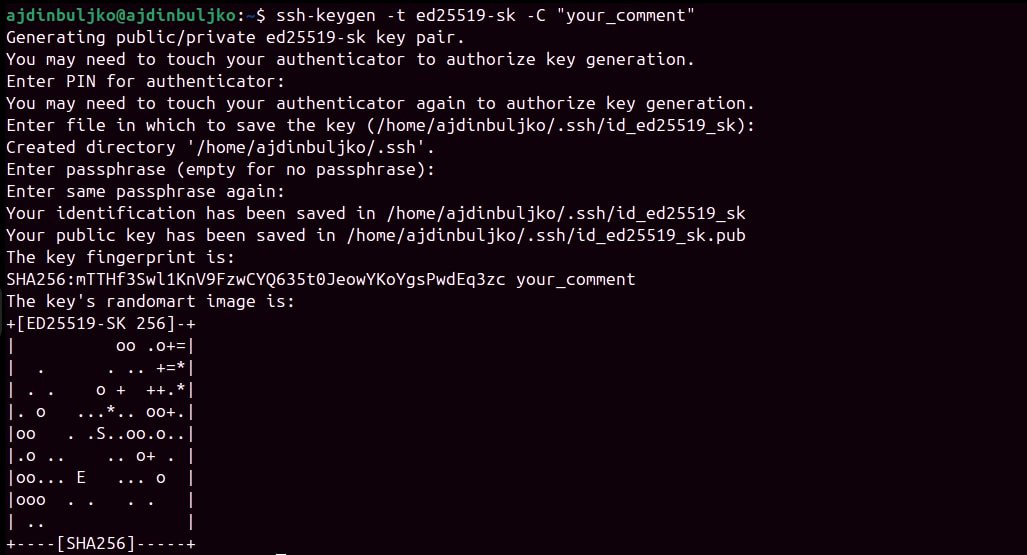
Adding Your Public Key
Ko je par ključev SSH ustvarjen, je treba javni ključ dodati v storitev ali strežnik, do katerega želite dostopati.
Display your public key:
cat ~/.ssh/id_ed25519_sk.pubIzhodni primer (ne uporabljajte te tipke):
sk-ssh-ed25519@openssh.com AAAAGnNrLXNzaC1lZDI1NTE5QG7wZW4zc2guY29tAAAAILeZl6r07HV4i1rK07OfLqD3J4IzX2q0lB6Ok0pdxoG5AAAABHNzaDo= your_comment
Copy the output and add it to your account’s SSH key settings.
See GitLab or GitHub for detailed steps.
Če želite omogočiti oddaljeni dostop do strežnika SSH, dodajte svoj javni ključ v datoteko
~/.ssh/authorized_keyssvojega uporabniškega računa v strežniku SSH.