入门
To access the OpenPGP smart card of the Nitrokey, install the package libccid. On Debian/Ubuntu based Distributions type in terminal: sudo apt-get update && sudo apt-get install libccid For Fedora please refer to this guide.
Once you plug in the Nitrokey, your computer will start the Keyboard Setup Assistant. Don't run through this assistant but exit it right away.
将你的Nitrokey连接到电脑上,并确认所有的对话框,这样USB智能卡设备驱动程序就几乎自动安装了。Windows可能无法为智能卡安装一个额外的设备驱动程序。忽略这个警告是安全的。
下载并启动`Nitrokey App <https://www.nitrokey.com/download>`__。
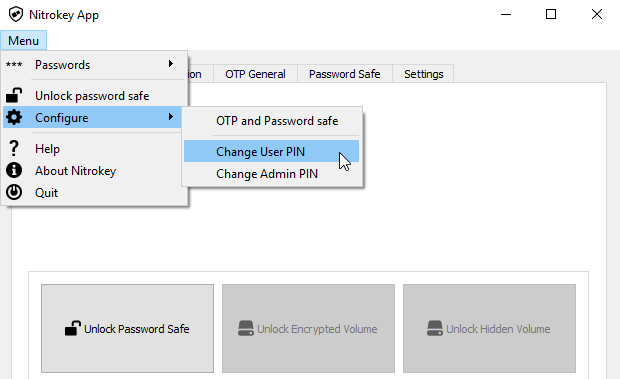
Use the Nitrokey-App to change the default User PIN (default: 123456) and Admin PIN (default: 12345678) to your own choices.
你的Nitrokey现在可以使用了。
备注
对于某些版本的MacOS来说,有必要安装自定义的`ccid驱动<https://github.com/martinpaljak/osx-ccid-installer>`__(信息见`这里<https://ludovicrousseau.blogspot.com/2016/04/os-x-el-capitan-and-ccid-driver-upgrades.html>`__),但一般来说MacOS应该有板载驱动。
对于所述的许多用例,有必要在设备上安装OpenPGP或S/MIME密钥(见下文)。
小技巧
注意:对于所述的许多用例,有必要在设备上安装OpenPGP或S/MIME密钥(见下文)。
用OpenPGP或S/MIME创建密钥
目前有两种广泛使用的电子邮件加密标准。OpenPGP/GnuPG在个人中很受欢迎,而S/MIME/x.509则大多被企业使用。如果你对选择哪一个有疑问,你应该使用OpenPGP。
To learn more about how to use OpenPGP for email encryption with the Nitrokey, please refer to chapter OpenPGP Email Encryption.
To learn more about how to use S/MIME for email encryption with the Nitrokey, please refer to chapter S/MIME Email Encryption.