Como Começar
To access the OpenPGP smart card of the Nitrokey, install the package libccid. On Debian/Ubuntu based Distributions type in terminal: .. code-block:: bash
$ sudo apt-get update && sudo apt-get install libccid
Important: Once you plug in the Nitrokey, your computer will start the Keyboard Setup Assistant. Don’t run through this assistant but exit it right away.
Ligue a sua Nitrokey ao seu computador e confirme todas as caixas de diálogo para que o driver do dispositivo USB smart card seja instalado quase automaticamente.
Nota
O Windows pode não conseguir instalar um driver de dispositivo adicional para o Cartão Smart Card. É seguro ignorar este aviso.
Descarregar e iniciar o Nitrokey App.
Descarregar e iniciar o Nitrokey App. Talvez queira armazená-lo na partição não encriptada do seu Nitrokey Storage
Download and start the Nitrokey App. Perhaps you want to store it on the unencrypted partition of your Nitrokey Storage. There won’t open a window, but an icon appears in the system tray (see screenshot below). Please right-click on this icon to use all the options of the App.
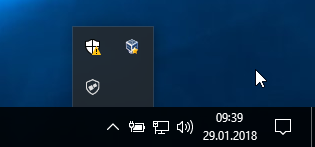
Open the About window from Nitrokey App’s menu and check if you have the latest firmware installed. If it’s not the latest, please update.
Utilize a aplicação Nitrokey para alterar o PIN de utilizador (por defeito: 123456) e o PIN de Admin (por defeito: 12345678) para as suas próprias escolhas.
A sua Nitrokey está agora pronta a ser utilizada.
Nota
Para algumas Versões de MacOS é necessário instalar custom ccid driver (para informação ver here), mas em geral o MacOS deve ter o driver a bordo.
Para muitos casos de uso descritos, é necessário ter as teclas OpenPGP ou S/MIME instaladas no dispositivo (ver abaixo).
Criação de chaves com OpenPGP ou S/MIME
Existem dois padrões amplamente utilizados para criptografia de e-mail. Enquanto OpenPGP/GnuPG é popular entre os indivíduos, S/MIME/x.509 é usado principalmente por empresas. Se você estiver em dúvida sobre qual escolher, você deve usar o OpenPGP.
To learn more about how to use OpenPGP for email encryption with the Nitrokey, please refer to chapter OpenPGP Email Encryption.
To learn more about how to use S/MIME for email encryption with the Nitrokey, please refer to chapter S/MIME Email Encryption.