Kom godt i gang
To access the OpenPGP smart card of the Nitrokey, install the package libccid. On Debian/Ubuntu based Distributions type in terminal: .. code-block:: bash
$ sudo apt-get update && sudo apt-get install libccid
Important: Once you plug in the Nitrokey, your computer will start the Keyboard Setup Assistant. Don’t run through this assistant but exit it right away.
Tilslut din Nitrokey til din computer, og bekræft alle dialogbokse, så driveren til USB smart card-enheden installeres næsten automatisk.
Bemærk
Windows installerer muligvis ikke en ekstra enhedsdriver til smartkortet. Det er sikkert at ignorere denne advarsel.
Download og start Nitrokey App.
Download og start Nitrokey App. Måske vil du gemme den på den ukrypterede partition på din Nitrokey Storage
Download and start the Nitrokey App. Perhaps you want to store it on the unencrypted partition of your Nitrokey Storage. There won’t open a window, but an icon appears in the system tray (see screenshot below). Please right-click on this icon to use all the options of the App.
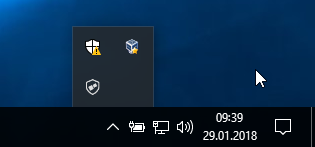
Open the About window from Nitrokey App’s menu and check if you have the latest firmware installed. If it’s not the latest, please update.
Brug Nitrokey-appen til at ændre standard PIN-koden til bruger (standard: 123456) og administrator PIN-koden (standard: 12345678) til dine egne valg.
Din Nitrokey er nu klar til brug.
Bemærk
I nogle versioner af MacOS er det nødvendigt at installere en brugerdefineret ccid-driver (se her for oplysninger), men generelt bør MacOS have driveren indbygget i systemet.
I mange af de beskrevne anvendelsestilfælde er det nødvendigt at have enten OpenPGP- eller S/MIME-nøgler installeret på enheden (se nedenfor).
Oprettelse af nøgler med OpenPGP eller S/MIME
Der findes to udbredte standarder for e-mail-kryptering. Mens OpenPGP/GnuPG er populært blandt privatpersoner, bruges S/MIME/x.509 mest af virksomheder. Hvis du er i tvivl om, hvilken af dem du skal vælge, bør du bruge OpenPGP.
To learn more about how to use OpenPGP for email encryption with the Nitrokey, please refer to chapter OpenPGP Email Encryption.
To learn more about how to use S/MIME for email encryption with the Nitrokey, please refer to chapter S/MIME Email Encryption.