Začetek
To access the OpenPGP smart card of the Nitrokey, install the package libccid. On Debian/Ubuntu based Distributions type in terminal: .. code-block:: bash
$ sudo apt-get update && sudo apt-get install libccid
Important: Once you plug in the Nitrokey, your computer will start the Keyboard Setup Assistant. Don’t run through this assistant but exit it right away.
Nitrokey priključite na računalnik in potrdite vsa pogovorna okna, da se gonilnik pametne kartice USB namesti skoraj samodejno.
Opomba
Sistem Windows morda ne bo uspel namestiti gonilnika dodatne naprave za pametno kartico. To opozorilo lahko ignorirate.
Prenesite in zaženite aplikacijo Nitrokey App.
Prenesite in zaženite aplikacijo Nitrokey App. Morda jo želite shraniti na nešifrirani razdelek v shrambi Nitrokey
Download and start the Nitrokey App. Perhaps you want to store it on the unencrypted partition of your Nitrokey Storage. There won’t open a window, but an icon appears in the system tray (see screenshot below). Please right-click on this icon to use all the options of the App.
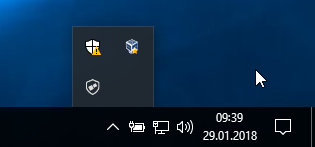
Open the About window from Nitrokey App’s menu and check if you have the latest firmware installed. If it’s not the latest, please update.
Z aplikacijo Nitrokey spremenite privzeta uporabniška PIN (privzeto: 123456) in skrbniški PIN (privzeto: 12345678).
Nitrokey je zdaj pripravljen za uporabo.
Opomba
Za nekatere različice sistema MacOS je treba namestiti lasten drajnik ccid (za informacije glejte tudi), vendar bi moral imeti MacOS na splošno gonilnik na krovu.
Za številne opisane primere uporabe je treba v napravo namestiti ključe OpenPGP ali S/MIME (glejte spodaj).
Ustvarjanje ključev z OpenPGP ali S/MIME
Za šifriranje e-pošte se pogosto uporabljata dva standarda. OpenPGP/GnuPG je priljubljen med posamezniki, S/MIME/x.509 pa večinoma uporabljajo podjetja. Če ste v dvomih, katerega izbrati, uporabite OpenPGP.
To learn more about how to use OpenPGP for email encryption with the Nitrokey, please refer to chapter OpenPGP Email Encryption.
To learn more about how to use S/MIME for email encryption with the Nitrokey, please refer to chapter S/MIME Email Encryption.