Aan de slag
To access the OpenPGP smart card of the Nitrokey, install the package libccid. On Debian/Ubuntu based Distributions type in terminal: .. code-block:: bash
$ sudo apt-get update && sudo apt-get install libccid
Important: Once you plug in the Nitrokey, your computer will start the Keyboard Setup Assistant. Don’t run through this assistant but exit it right away.
Sluit de Nitrokey aan op de computer en bevestig alle dialoogvensters, zodat het stuurprogramma voor de USB smartcard bijna automatisch wordt geïnstalleerd.
Notitie
Windows slaagt er mogelijk niet in een extra stuurprogramma voor de smartcard te installeren. Het is veilig om deze waarschuwing te negeren.
Download en start de Nitrokey-app.
Download en start de Nitrokey-App. Misschien wilt u het opslaan op de onversleutelde partitie van uw Nitrokey-opslag
Download and start the Nitrokey App. Perhaps you want to store it on the unencrypted partition of your Nitrokey Storage. There won’t open a window, but an icon appears in the system tray (see screenshot below). Please right-click on this icon to use all the options of the App.
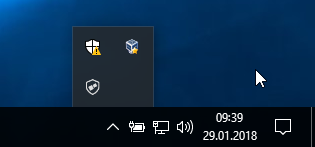
Open the About window from Nitrokey App’s menu and check if you have the latest firmware installed. If it’s not the latest, please update.
Gebruik de Nitrokey App om de standaard gebruikers-PIN (standaard: 123456) en beheerders-PIN (standaard: 12345678) te wijzigen in uw eigen keuzes.
Uw Nitrokey is nu klaar voor gebruik.
Notitie
Voor sommige versies van MacOS is het nodig om een aangepaste ccid driver te installeren (voor informatie zie hier), maar in het algemeen zou MacOS de driver aan boord moeten hebben.
Voor veel van de beschreven gebruikssituaties is het noodzakelijk OpenPGP- of S/MIME-sleutels op het toestel geïnstalleerd te hebben (zie hieronder).
Sleutel aanmaken met OpenPGP of S/MIME
Er zijn twee veelgebruikte standaarden voor e-mailversleuteling. Terwijl OpenPGP/GnuPG populair is bij particulieren, wordt S/MIME/x.509 meestal gebruikt door ondernemingen. Als u twijfelt welke u moet kiezen, kunt u het beste OpenPGP gebruiken.
To learn more about how to use OpenPGP for email encryption with the Nitrokey, please refer to chapter OpenPGP Email Encryption.
To learn more about how to use S/MIME for email encryption with the Nitrokey, please refer to chapter S/MIME Email Encryption.