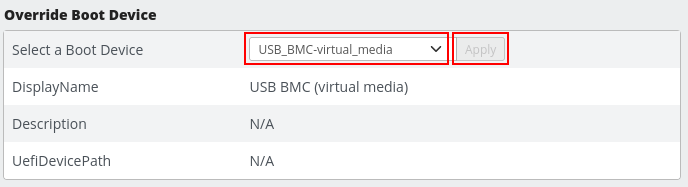
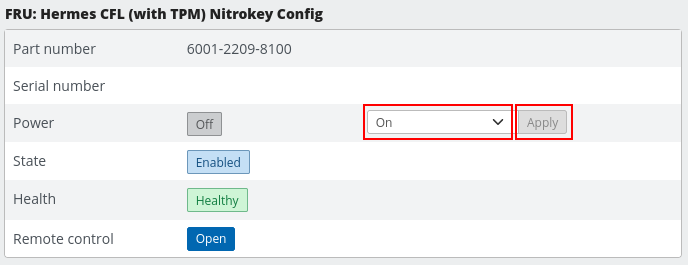
I det følgende beskrives fremgangsmåden for softwareopdatering af NetHSM-systemsoftwaren. Denne installationsmetode bør kun anvendes, hvis den opdatering, der er beskrevet på Software Update, ikke er tilgængelig. Følg instruktionerne nøje for at undgå utilsigtet sletning af data. Det anbefales at eksportere en sikkerhedskopi fra NetHSM, inden opdateringen udføres.
The system software update can be performed as follows.
Download the installer image ending with installer.img.zip from the provided private download page.
Pak installationsbilledet ud.
Write the installer image to a USB flash drive.
For this you could use the graphical tool balenaEtcher.
On Linux you could also use the command line tool dd.
Ignore any warning that a partition table is missing.
Tilslut USB-nøglen til en vilkårlig USB-port på forsiden eller til en af de to USB 2.0-porte, der er placeret midt på bagsiden af enheden. USB 2.0-portene har en sort indsats midt i porten.
Bemærk
Some USB drives are incompatible with the NetHSM.
This results in the NetHSM not recognizing them as a boot media.
In case the NetHSM does not boot from the connected USB drive, try a different USB drive model.
Sluk for NetHSM’en, og tag stikket ud af stikkontakten.
Connect a monitor and optionally a keyboard to the NetHSM.
Bemærk
Sørg for, at der kun er tilsluttet tastaturet og USB-nøglen til USB-portene.
Connect the NetHSM to power and wait for 10 seconds.
Turn on the NetHSM by pressing the power button on the front.
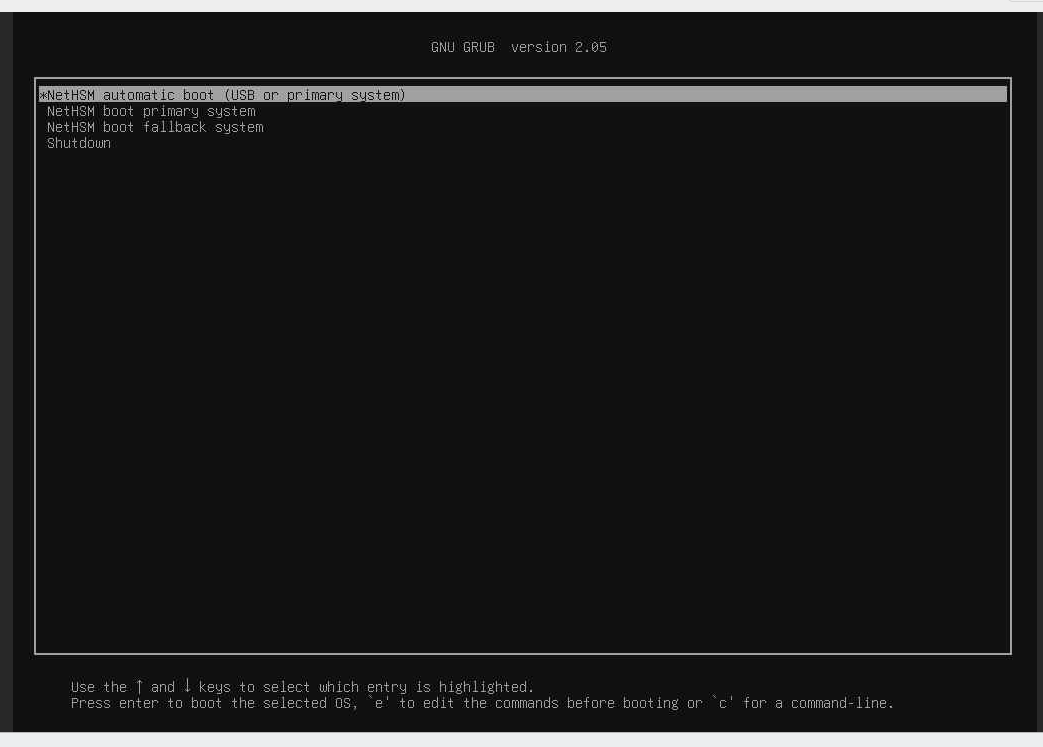
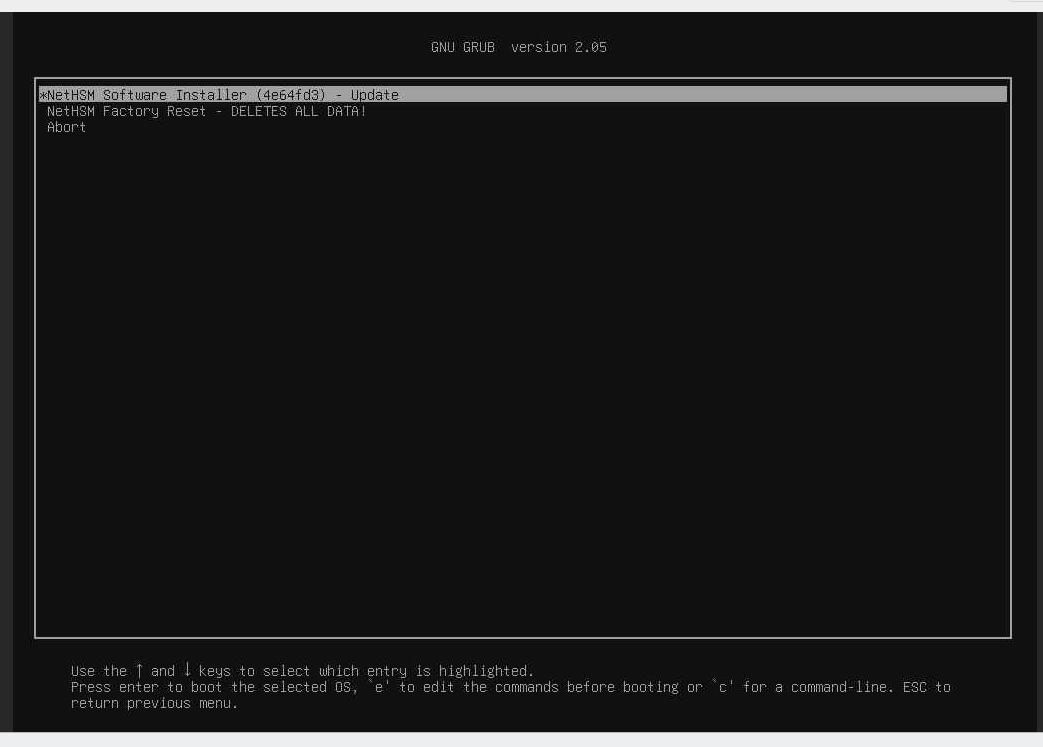
Efter ca. 30 sekunder viser NetHSM en opstartsmenu på skærmen. Opstartsmenuen er som standard indstillet til at udføre softwareopdateringen. Dette tager ca. 2 minutter. Maskinen slukker automatisk efter opdateringen.
Alternatively you can select NetHSM automatic boot (USB or primary system) in the first boot menu and then NetHSM Software Installer in the second boot menu.
Advarsel
Do NOT select NetHSM Factory Reset - DELETES ALL DATA! from the menu.
This will irrecoverably wipe the data on the disk.
Turn on the NetHSM by pressing the power button on the front.
Download the installer image ending with installer.img.zip from the provided private download page.
Pak installationsbilledet ud.
Sørg for, at systemet er slukket, men tilsluttet strøm, og at tænd/sluk-knappen på bagsiden er tændt.
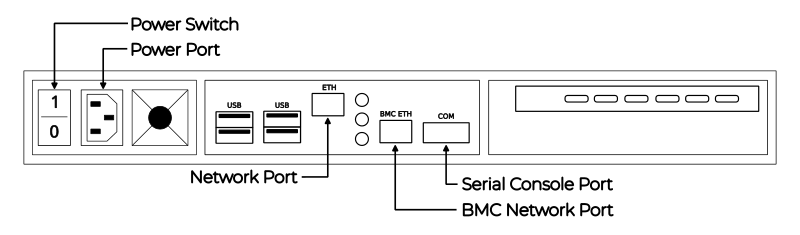
Forbind BMC-netværksporten med et netværkskabel.
Se billedet nedenfor for at identificere BMC-netværksporten.
Som standard vil BMC vente på en adressetildeling med DHCP. Hvis DHCP ikke er tilgængelig, kan den link-lokale adresse bestemmes med Nmap. Kommandoen nmap<network-in-cidr-notation>-p80--open returnerer en liste over værter med åben port 80.
Åbn BMC’s hjemmeside i en webbrowser ved hjælp af den IP-adresse, der blev fundet i det foregående trin. For at logge ind er standardoplysningerne brugernavn bmc_admin og adgangskode 8mCU$3r0nE.
Vigtigt
In case you encounter an unauthorized login error on the BMC web interface it can be one of the following issues.
Forkert brugernavn eller adgangskode.
Under fabriksnulstilling genererer BMC et nyt TLS-certifikat. Nogle webbrowsere fejler med forbindelsesfejl, når certifikatet ændres, mens det samme vindue forbliver åbent. Luk webbrowservinduet, og åbn et nyt.
BMC-softwaren viser nogle gange det problem, at den ikke accepterer en ældre sessionscookie, som stadig ligger i webbrowserens cache. Ryd browserens cache, og prøv igen.
Mount the downloaded installer image by clicking in the menu on the left on FRU: Hermes CFL (with TPM) Nitrokey Config followed by Virtual media in the submenu.
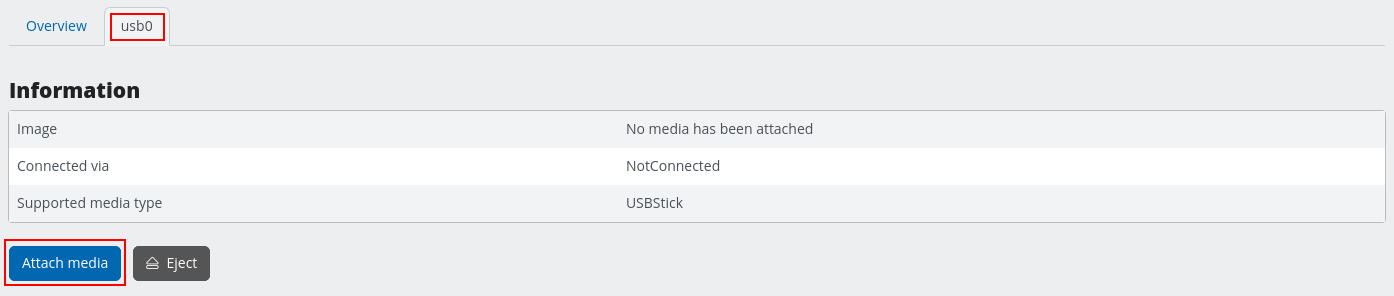
In the middle open the tab usb0, and click the button Attach media.
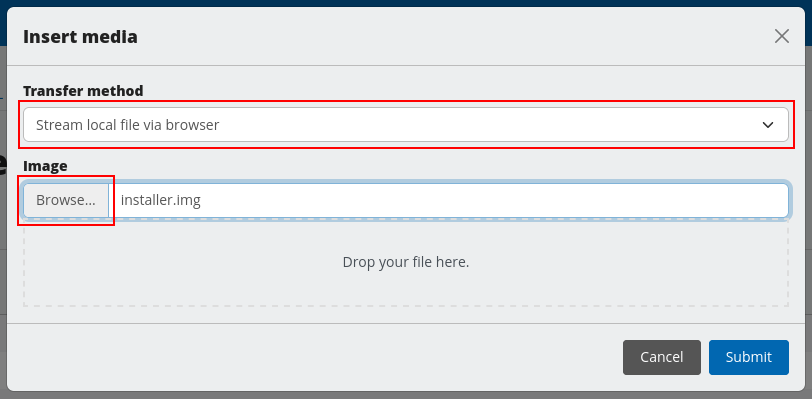
In the opening dialog choose Stream local file via browser as the Transfer method.
Click the button Browse… and choose the downloaded installer image.
Confirm the operation with the Submit button.