Recuperación del sistema
The following describes the recovery process for the NetHSM system software. These instructions are only applicable if the API is inoperable, e.g. not responding to API requests. In the case of an operable API perform a factory reset instead. Follow the instructions precisely to prevent any accidental deletion of data.
Importante
La recuperación del sistema sólo funciona si la tabla de particiones GUID (GPT) y las propias particiones del disco no están dañadas. Una corrupción podría ser indicada por el siguiente mensaje durante el arranque.
Booting 'NetHSM automatic boot (USB or primary system)'

GRUB: No valid configuration found on (usb0).
GRUB: No valid configuration found on (ahci0,gpt1).

GRUB: Booting failed. System will switch off in 10 second.
Si están dañados, estas instrucciones darán lugar a una instalación de fábrica del software del sistema NetHSM.
La recuperación del sistema puede realizarse del siguiente modo.
Descargue la imagen del instalador que termina en …installer.img.zip desde la página privada de descargas proporcionada.
Importante
Descargue la imagen del instalador de la misma versión que estaba instalada en el momento de la corrupción. No es posible realizar un downgrade ni un upgrade saltándose versiones.
Descomprima la imagen del instalador.
Escribe la imagen del instalador en una memoria USB. Para ello puede utilizar la herramienta gráfica balenaEtcher. En Linux también puedes utilizar la herramienta de línea de comandos dd. Ignora cualquier aviso de que falta una tabla de particiones.
Conecta la memoria USB a un puerto USB del NetHSM. El NetHSM puede arrancar desde los puertos USB situados en la parte delantera del dispositivo y desde los cuatro puertos apilados verticalmente en la parte trasera del mismo.
Nota
Some USB drives are incompatible with the NetHSM. This results in the NetHSM not recognizing them as a boot media. In case the NetHSM does not boot from the connected USB drive, try a different USB drive model. Best results are achieved with drives that have smaller capacities and USB 2.0 interface.
Optionally: Connect a keyboard and monitor with the NetHSM.
Make sure the system is turned off, but connected to power.
Turn the NetHSM on by pressing the power button on the front.
Now the software is going to be installed. Wait for ca. one minute until the NetHSM shuts down. Optionally, if you have a monitor connected: When you see the boot menu, select NetHSM automatic boot (USB or primary system) in the first menu and then NetHSM Software Installer in the second menu.
Advertencia
NO seleccione
NetHSM Factory Reset - DELETES ALL DATA!en el menú. Esto borrará irrecuperablemente los datos del disco.
Download the installer image ending with
installer.img.zipfrom the provided private download page.Importante
Descargue la imagen del instalador de la misma versión que estaba instalada en el momento de la corrupción. No es posible realizar un downgrade ni un upgrade saltándose versiones.
Asegúrese de que el sistema está apagado, pero conectado a la corriente, y el botón de encendido de la parte posterior encendido.
Conecte el puerto de red del BMC con un cable de red.
Consulte la siguiente imagen para identificar el puerto de red BMC.
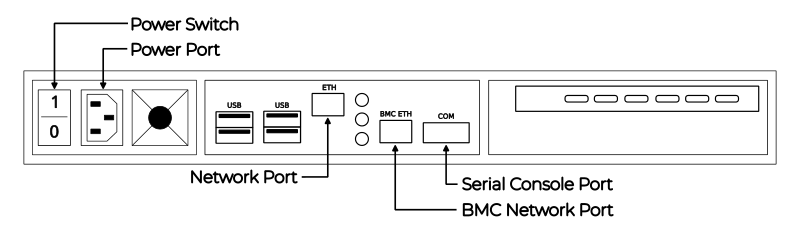
Parte trasera del servidor
Por defecto, el BMC espera una asignación de dirección con DHCP. Si DHCP no está disponible, la dirección link-local se puede determinar con Nmap. El comando
nmap <network-in-cidr-notation> -p 80 --opendevolverá una lista de hosts con el puerto 80 abierto.Abra el sitio web de BMC en un navegador web, utilizando la dirección IP determinada en el paso anterior. Para iniciar sesión, las credenciales predeterminadas son nombre de usuario
bmc_admin, y contraseña8mCU$3r0nE.Importante
Si se produce un error de inicio de sesión no autorizado en la interfaz web de BMC, puede deberse a tres de los siguientes problemas.
Nombre de usuario o contraseña incorrectos.
Durante el restablecimiento de fábrica, el BMC genera un nuevo certificado TLS. Algunos navegadores web fallan con errores de conexión cuando cambia el certificado mientras permanece abierta la misma ventana. Cierre la ventana del navegador web y abra una nueva.
El software BMC a veces muestra el problema de que no acepta una cookie de sesión antigua que todavía está en la caché del navegador web. Borre la caché del navegador web y vuelva a intentarlo.
Monte la imagen del instalador descargada haciendo clic en el menú de la izquierda en FRU: Hermes CFL (con TPM) Nitrokey Config seguido de Virtual media en el submenú. En el centro abra la pestaña usb0, y haga clic en el botón Attach media.
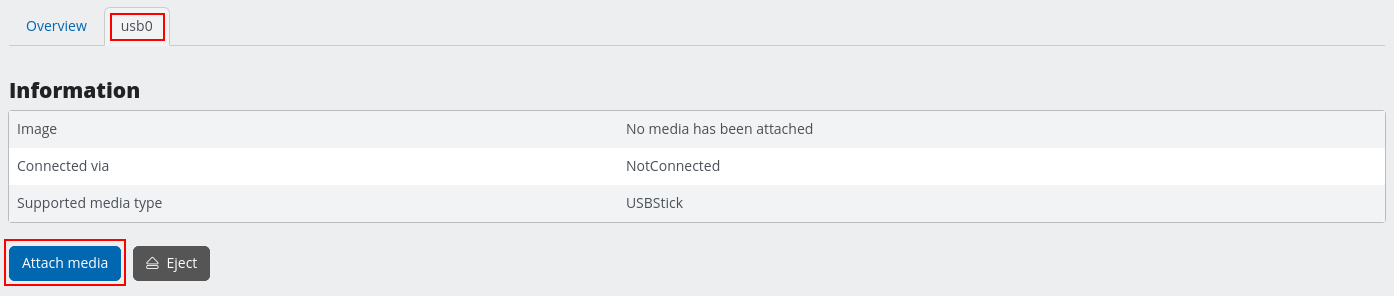
Menú BMC para conectar el dispositivo USB
En el cuadro de diálogo de apertura, elija Transmitir archivo local a través del navegador como método de transferencia ** . Haga clic en el botón Examinar… y elija la imagen del instalador descargada. Confirme la operación con el botón Enviar.
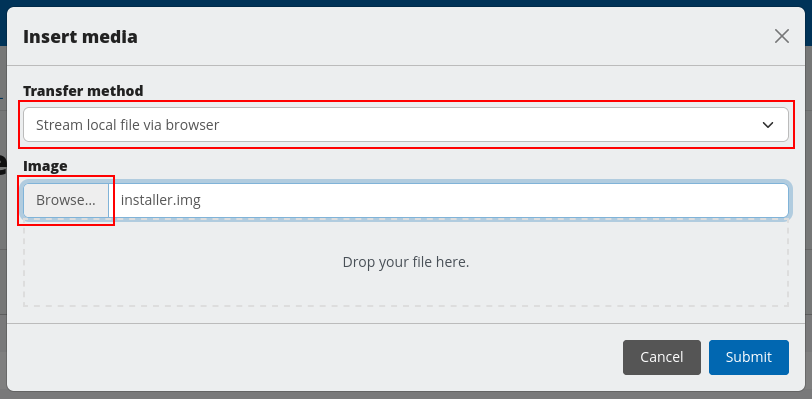
Menú BMC para seleccionar la imagen USB
En el menú de la izquierda seleccione FRU: Hermes CFL (con TPM) Nitrokey Config, y a continuación Remote KVM.
En el centro, haga clic en el botón Abrir una ventana KVM remota flotante, en la esquina superior derecha del cuadro de salida VGA.
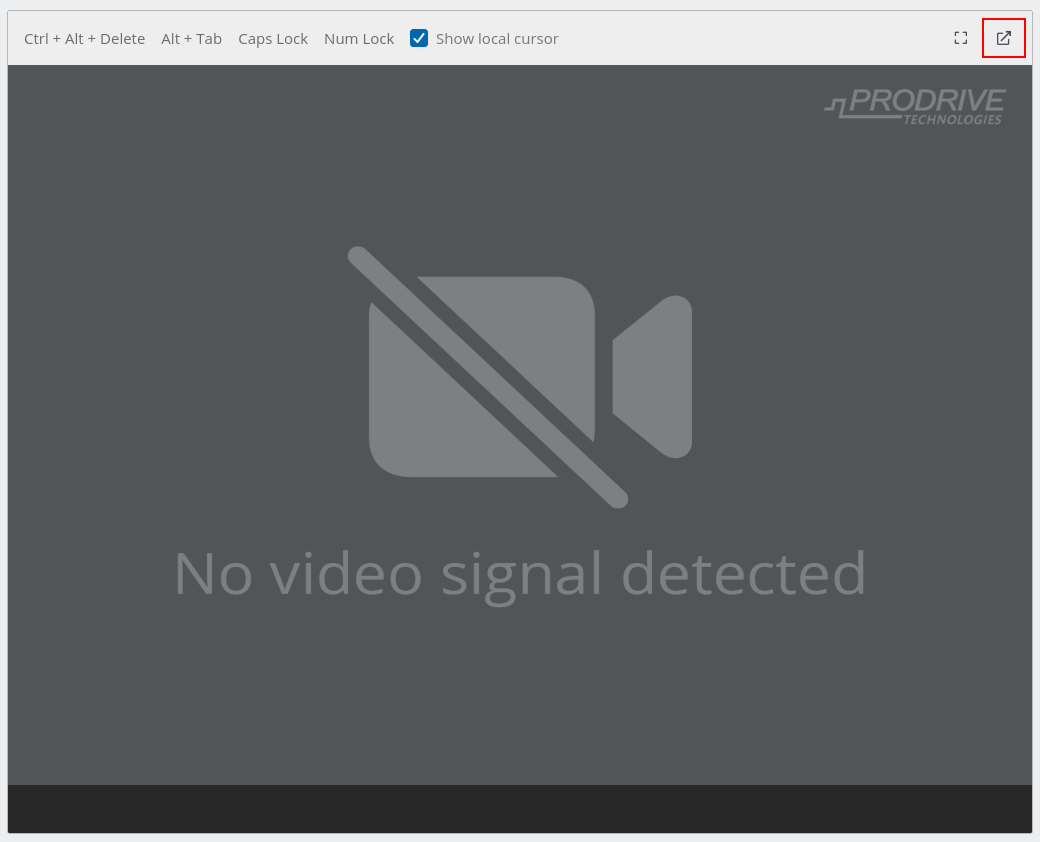
Vista de la consola BMC KVM
Esta ventana le mostrará la salida gráfica del instalador de NetHSM. Mantenga esta segunda ventana abierta junto con la ventana principal del BMC.
Cambie a la vista Visión general en la parte superior del menú de la izquierda.
En la casilla Override Boot Device, seleccione USB_BMC-virtual_media del menú desplegable junto a Select a Boot Device.
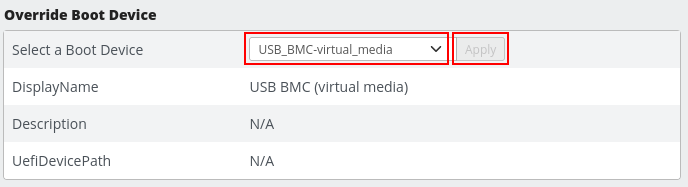
Configuración del dispositivo de arranque BMC
En el cuadro con el título FRU: Hermes CFL (with TPM) Nitrokey Config, seleccione On en el menú desplegable junto a Power. Confirme con el botón Apply.
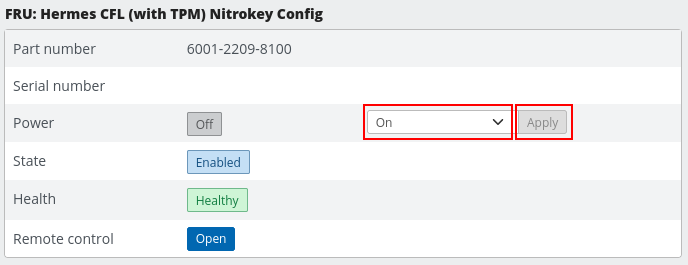
Configuración de encendido del BMC
En la ventana previamente abierta Remote KVM puede ver ahora el asistente de instalación.
La ventana KVM muestra ahora el diálogo de arranque. Confirme la selección de
NetHSM automatic boot (USB or primary system)con la tecla Enter.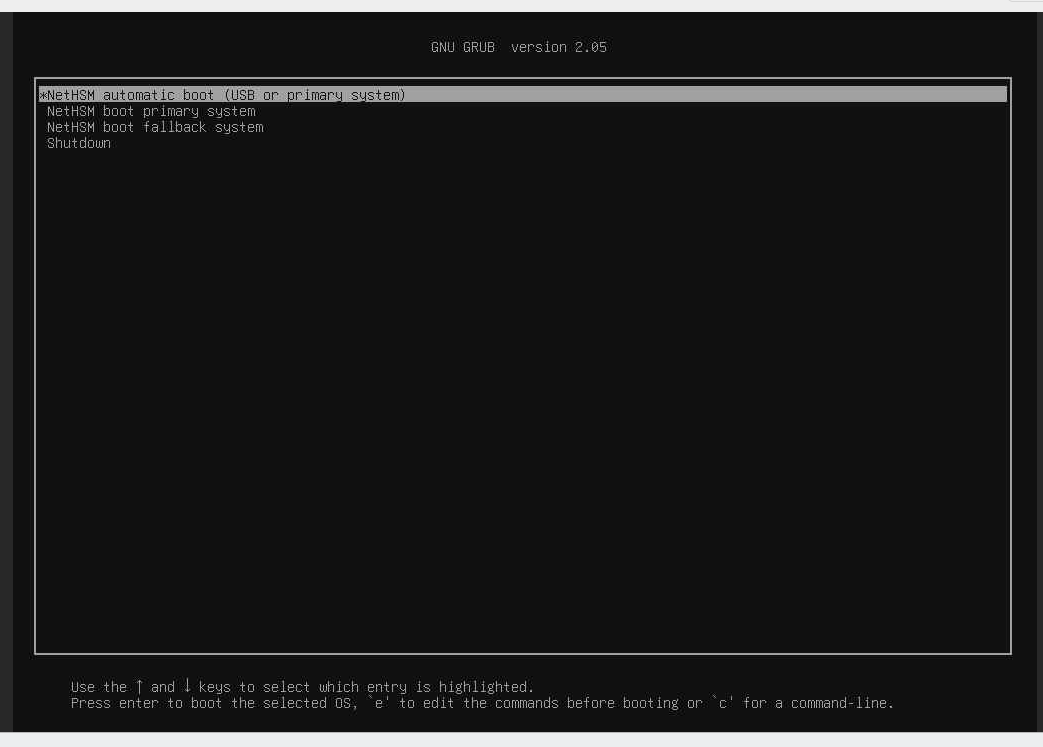
Selección de arranque NetHSM en la consola BMC KVM
En el siguiente diálogo confirme la selección de
NetHSM Software Installercon la tecla Introduzca.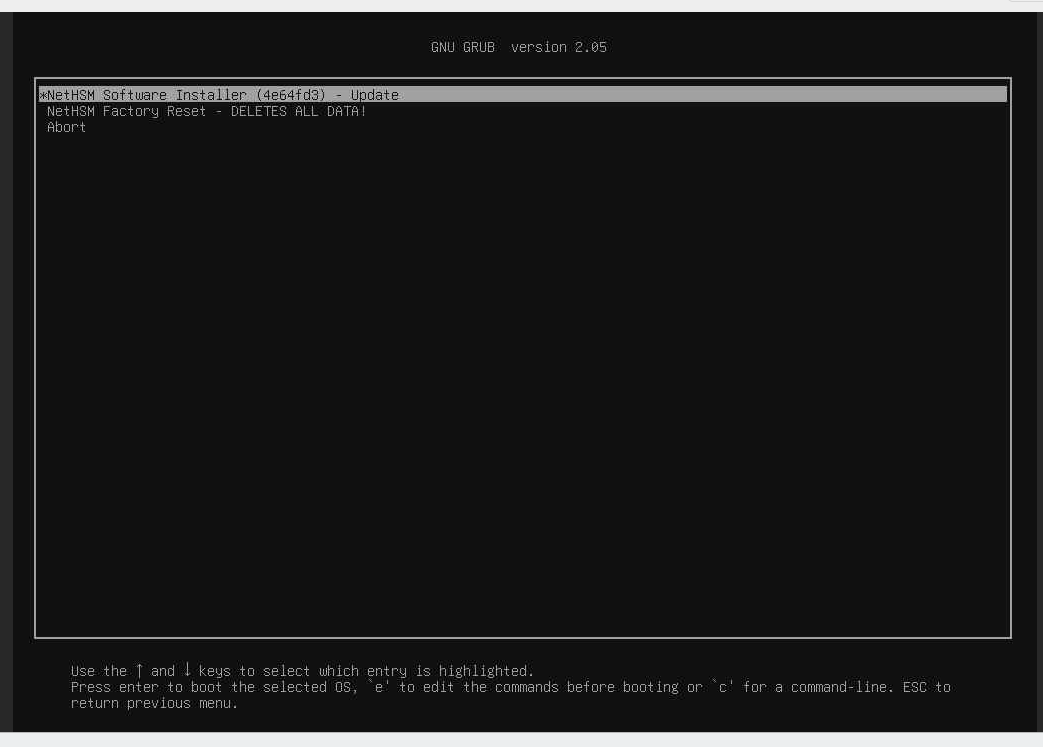
Selección del instalador NetHSM en la consola BMC KVM
Advertencia
NO seleccione
NetHSM Factory Reset - DELETES ALL DATA!en el menú. Esto borrará irrecuperablemente los datos del disco.
El instalador de NetHSM instalará el software del sistema y lo apagará.