Darbo pradžia
To access the OpenPGP smart card of the Nitrokey, install the package libccid. On Debian/Ubuntu based Distributions type in terminal: sudo apt-get update && sudo apt-get install libccid For Fedora please refer to this guide.
Once you plug in the Nitrokey, your computer will start the Keyboard Setup Assistant. Don’t run through this assistant but exit it right away.
Prijunkite „Nitrokey“ prie kompiuterio ir patvirtinkite visus dialogo langus, kad USB išmaniosios kortelės įrenginio tvarkyklė būtų įdiegta beveik automatiškai. Windows gali nepavykti įdiegti papildomos išmaniosios kortelės įrenginio tvarkyklės. Šį įspėjimą galima ignoruoti.
Atsisiųskite ir paleiskite „Nitrokey“ programą.
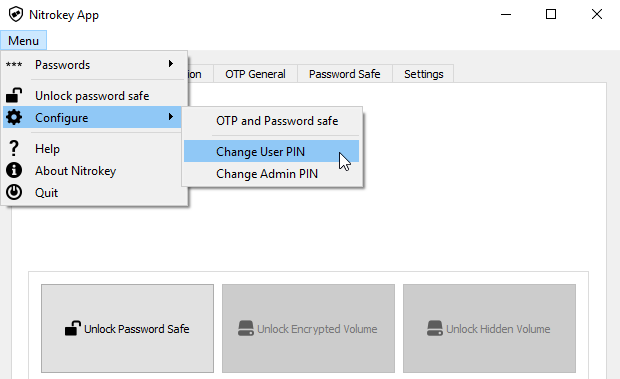
Use the Nitrokey-App to change the default User PIN (default: 123456) and Admin PIN (default: 12345678) to your own choices.
Dabar jūsų „Nitrokey“ yra paruoštas naudoti.
Pastaba
Kai kuriose „MacOS“ versijose reikia įdiegti pasirinktinę ccid tvarkyklę (informacijos žr. ` čia <https://ludovicrousseau.blogspot.com/2016/04/os-x-el-capitan-and-ccid-driver-upgrades.html>`__), tačiau paprastai „MacOS“ turėtų turėti integruotą tvarkyklę.
Daugeliu aprašytų naudojimo atvejų būtina, kad įrenginyje būtų įdiegti OpenPGP arba S/MIME raktai (žr. toliau).
Patarimas
Pastaba: daugeliu aprašytų naudojimo atvejų būtina, kad įrenginyje būtų įdiegti OpenPGP arba S/MIME raktai (žr. toliau).
Rakto kūrimas naudojant OpenPGP arba S/MIME
Yra du plačiai naudojami el. pašto šifravimo standartai. „OpenPGP/GnuPG“ populiarus tarp privačių asmenų, o S/MIME/x.509 dažniausiai naudojamas įmonėse. Jei abejojate, kurį pasirinkti, turėtumėte naudoti OpenPGP.
To learn more about how to use OpenPGP for email encryption with the Nitrokey, please refer to chapter OpenPGP Email Encryption.
To learn more about how to use S/MIME for email encryption with the Nitrokey, please refer to chapter S/MIME Email Encryption.